Overview
The knowledge bank is for autodidacts and the intellectually curious. It’s a collection of structured, AI-generated articles that serve as a custom reference library. Each article provides a focused intro and overview of topics you’re unfamiliar with or only vaguely understand. Articles also serve as launch points for deeper exploration. Topics rarely appear just once. They surface frequently enough to seem familiar but not enough to commit details to memory. Your knowledge bank becomes your first search stop—before reaching for an LLM or Google.Why build your own knowledge base?
Why not just use Grokipedia? You should. But AI gives you better options for personal learning. Here are the benefits: Tailored content. AI-generated articles use your prompts or skills, structured to your preferences. If you use an LLM with memory (like Claude), articles incorporate your context, language, and mental models. The creation process is interactive—ask follow-ups, request expansions, and incorporate them into the final article. Living documents. Add the initial article, then grow it over time. Link related content, append resources, add new insights as you encounter the topic again. The page evolves with your understanding. Annotation and linking. Highlight text, add notes, and link to other pages in your system. This creates a knowledge graph with pages as nodes and links as edges. Add custom metadata. Make the content yours. Discovery and serendipity. Browsing your collection reveals connections traditional search misses. Re-encountering topics shows how your thinking evolved. Random exploration surfaces unexpected insights. Compounding knowledge. Each article gains value as your graph grows. Cross-referencing deepens. New topics build on existing articles, creating a foundation that accelerates future learning. Personal voice. AI-generated articles match your mental models, use your terminology, and capture why topics matter to you—not just what they are. Knowledge mapping. Pages and links reveal learning patterns and “hot spots” in your interests. Articles integrate with your other notes and projects, mapping your intellectual journey over time. Intellectual record. You’re building a tangible record of your development—potential foundation for future writing, teaching, or content creation. Data loss protection. Websites disappear, paywalls rise, content changes. Your curated knowledge persists.The anatomy of a knowledge article
A consistent page structure
Use the same structure for every article to reduce cognitive load. Know where to find information and where to file additional notes. Consistent structure also creates a forcing function for thoroughness and guides learning.| Section | Description |
|---|---|
| High-Level Overview | Provides context and explains why the topic matters. Quick orientation without details. |
| Key Dates / Timeline | Birth/death dates, publications, founding dates, major milestones. Only when chronology matters. |
| General Information | Core facts, contributions, characteristics. |
| Common Misconceptions | Include only when relevant. Points out items people often get wrong. |
| Recommendations for Further Exploration | At least 3 high-quality resources (books, papers, videos, courses). Excludes Wikipedia/Grokipedia – points to deeper content. |
| Related Topics | 3-5 related topics with explanation of how and why they connect. Builds understanding of the conceptual landscape. |
| Related Pages | A section for storing internal pages related to this topic.*” Fills over time as you build connections. Maps how the topic fits your knowledge graph. |
| Related Links | A section for storing external web links discovered during research and exploration related to this topic.*” Grows as you encounter the topic and find resources. |
Metadata
| Field | Purpose |
|---|---|
| Created On Date | When you first documented the topic. Creates a chronological map of your learning journey. Shows what you explored in different periods and highlights curiousity spikes. |
| Last Edited | How recently you interacted with the topic. Indicates if knowledge is fresh or needs refreshing. Reveals topics visited recently. |
| Tag(s) | High-level categories (systems, people, philosophy, technology, etc.). Multiple tags per article. Reveals themes over time. Enables filtered database views. |
| Summary | 1-3 sentence overview for database views. Jogs memory without opening the article. |
Workflow
Two approaches depending on context and urgency.Immediate creation
You need to understand a topic right now—it’s blocking your comprehension. Stop what you’re doing, open Claude, generate the article using the knowledge article writer skill. Read it, return to your work with the context you needed. Add the article to your extended mind system (Notion, Obsidian, etc.). Takes a few minutes. Problem solved, knowledge base built.Batched creation
A topic catches your eye but isn’t essential to your current work. Create a placeholder page: TODO: [Topic Name]. This captures the topic and makes it easy to locate later via database views or search. At day’s end or every few days, batch process the TODOs. Generate all articles at once. This creates dedicated time to read slowly, digest information, ask follow-ups, and do additional research. You’re learning, not just solving an immediate problem.Choose your approach
Immediate creation: topic is pertinent to current work, need knowledge now. Batched creation: building your knowledge base proactively, capturing topics for future exploration. Develop a rhythm that works for your learning style. Flexibility between approaches makes the system sustainable.Notion implementation
[Placeholder: How to set up and maintain knowledge articles in Notion]Obsidian implementation
[Placeholder: How to set up and maintain knowledge articles in Obsidian]AI Applications
[Placeholder: Prompts, Claude Skills, and other AI tools for creating and maintaining knowledge articles]Knowledge article prompt
Click to view the knowledge article prompt
Click to view the knowledge article prompt
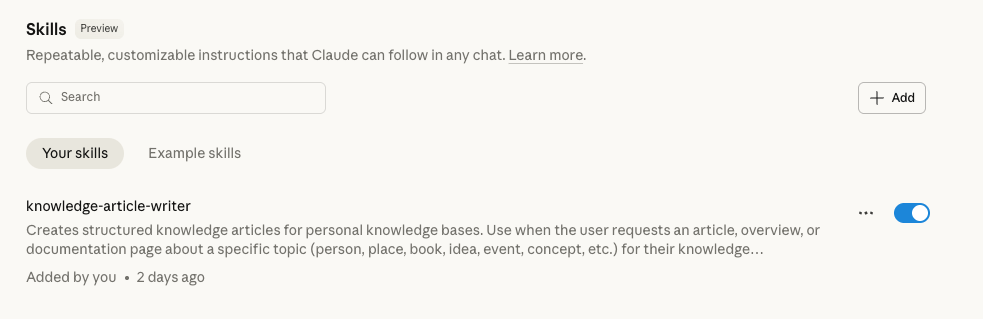
Claude Skill: knowledge-article-writer
In my own setup, I have the knowledge article prompt saved as a Claude Skill in the Claude Desktop app to avoind copying and pasting the prompt over and over again. Claude Skills